

The customer still hasn’t called anyone. Two minutes later, the operations team knows exactly what went wrong, why, and who should fix it.
Her call failed inside the office and her phone reported it on its own. A ticket reached the operator at 09:04, with no call and no complaint. Read episode 2 →
What lands in the operations room
On the main screen of the network operations centre (NOC), a city map shows live alerts as small pins. One of them, on the office building from the earlier episodes, pulses amber. At the same time, a new ticket slides into the queue.
The NOC screen at 09:06
Nobody typed it, classified it or asked the customer for details. Her identity stays masked: the team sees a device and a partial number, not a name.
The device card
The operator clicks the ticket and opens the full record of the phone that created it. The first thing on screen is not a signal chart: it is a check of the phone’s settings against what the operator expects.
Settings and signal on the same screen, at the same instant. Illustrative values from the video.
This is called configuration drift: a phone that was once set up correctly and no longer is. A software update, a factory reset or a tap in the wrong menu is enough. The network has no way to notice it.
The last 60 minutes
The card also replays what happened to the phone in the last hour. In two minutes the whole story is there, in order.
Device timeline · last 60 minutes
In episode 1, the support agent had none of this: a customer on a landline describing the problem from memory, and a network panel showing everything green.
The neighbours test
One phone with weak signal and a failed call could have many explanations. So the team asks a simple question: what about the other phones in the same building?
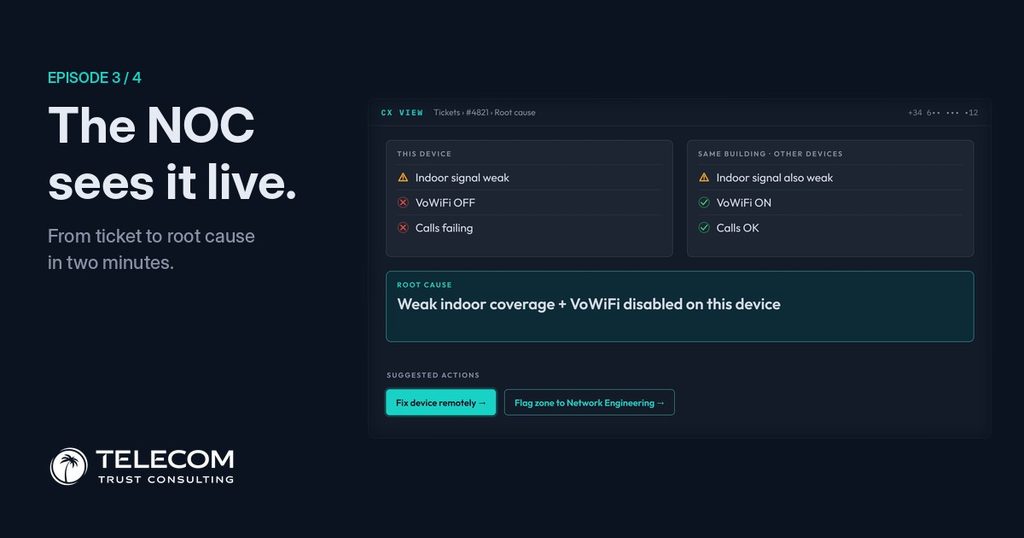
The comparison settles it. Everyone in the building has weak signal, so the coverage problem is real and it belongs to the network. But only this phone fails to call, and it is the only one with Wi-Fi calling off. The other phones are quietly rescued by the office Wi-Fi. Two causes, and only one of them is stopping her calls today.
Why one reading is not enough
Comparing is not a detail of this story. It is what makes device data trustworthy. The year-long study we used in the first article shows why.
Reading the phone’s settings next to the signal also rules out the opposite mistake: a misconfigured phone taken for a network fault. The sector bars are illustrative.
Two actions, two teams
With the cause split in two, the screen suggests two actions, each for a different team.
In episode 1, both problems ended in the same place: a ticket closed as No fault found. Here, each one goes to the team that can actually fix it, with the evidence already attached.
See the device, before the customer calls
At 09:06 the operator knows what the customer is living through, why, and who should fix it. She still hasn’t picked up the phone to complain, and she doesn’t need to.
What if the NOC could fix it from right here?
Without touching her phone. Without a single call.
Episode 4 of 4 · coming soon