

09:07. One click in the operations room. Two minutes later, the customer’s phone works again, and she never knows anything happened.
The operations team found the root cause in two minutes: weak indoor coverage, and Wi-Fi calling switched off on her phone. One of the suggested actions was “Fix device remotely”. Read episode 3 →
This final episode is what happens after that click. The customer is at her desk and has still not contacted support. The fix follows three simple steps.
Step 1: measure first
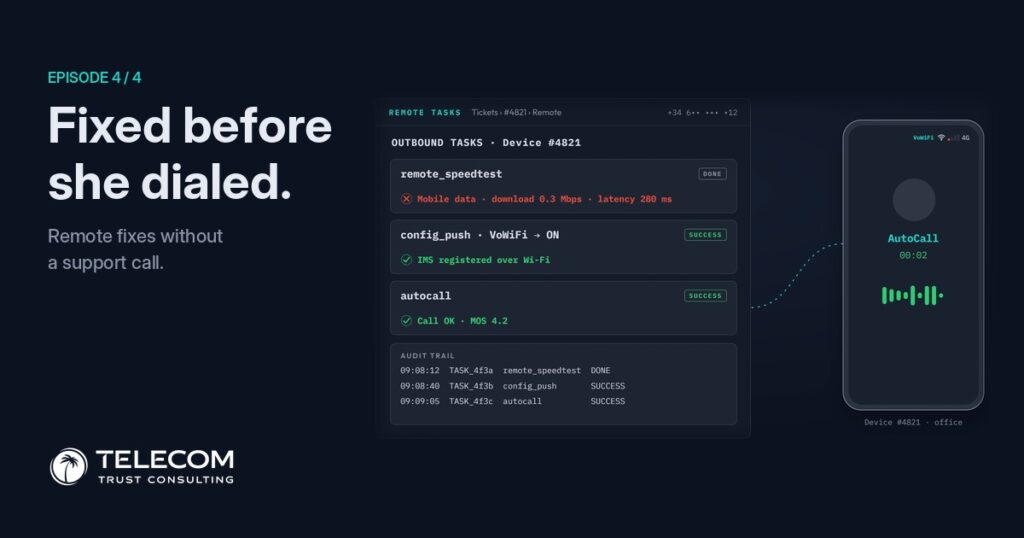
The click opens a list of tasks the operator can send to that one phone. The first one does not change anything. A remote speed test runs on her phone in the background, over mobile data, and confirms what the device card suggested: 0.3 Mbps download and 280 ms latency. Inside that building, her mobile connection is barely usable.
Measuring first gives the team a baseline, so the effect of the fix can be proven rather than assumed.
Step 2: the fix
The second task changes one setting: Wi-Fi calling, from off to on. Nothing else on the phone is touched. A few seconds later the phone confirms the change, and something more important: it is now registered for calls over Wi-Fi.
Outbound tasks · Device #4821
She doesn’t have to find the setting, restart the phone or follow instructions from an agent. Her identity stays masked on screen.
Step 3: prove it
A setting that looks right is not the same as a call that works. So the third task places an automatic test call from her phone. The result: call connected, voice quality score (MOS) 4.2. Five minutes earlier, the same phone in the same room could not connect a call at all.
Voice quality score (MOS)
4.2 is a clear, normal conversation. Only now is the ticket considered solved: measured before, fixed, and verified after.
The audit trail
Every action on a customer’s phone must leave a record. Each task is logged with an ID, a time stamp and its result.
Under a minute from the first task to the last. If anyone later asks what was changed on this phone, when and by whom, the answer is already written down.
What she noticed: nothing
Back in the office, her phone rings. She answers and talks normally. She doesn’t know there was a problem, a ticket, a diagnosis or a fix. From her side, the phone simply works. From the operator’s side, the change is measurable.
Before → after Illustrative values
after: over Wi-Fi
The other half of the root cause is not forgotten. Everyone in the building will benefit from the coverage work later. She didn’t have to wait for it.
Not a one-off
Our story is one phone and one setting. In real deployments the same approach runs across whole customer bases.
Device-side correction in production
The safeguards that make it possible
Four episodes, one customer
The same call failed in the same office in every episode. What changed was how much the operator could see, and how fast it could act.
The network will always be the foundation. But customers don’t experience the network. They experience their phone. Operators who can see through the device find problems sooner, fix them faster, and spend less time searching for faults their dashboards will never show.
See your network through the device.
Higher experience. Measurable quality. Zero support calls.
Episode 4 of 4 · end of the series